Vectors
A vector allows you to store a variable number of values next to each other in memory. Vectors can only store values of the same type, making them useful when you have a list of items, such as the items in a shopping cart or the lines of text in a file. Vectors are one of the most commonly used collection types in Rust.
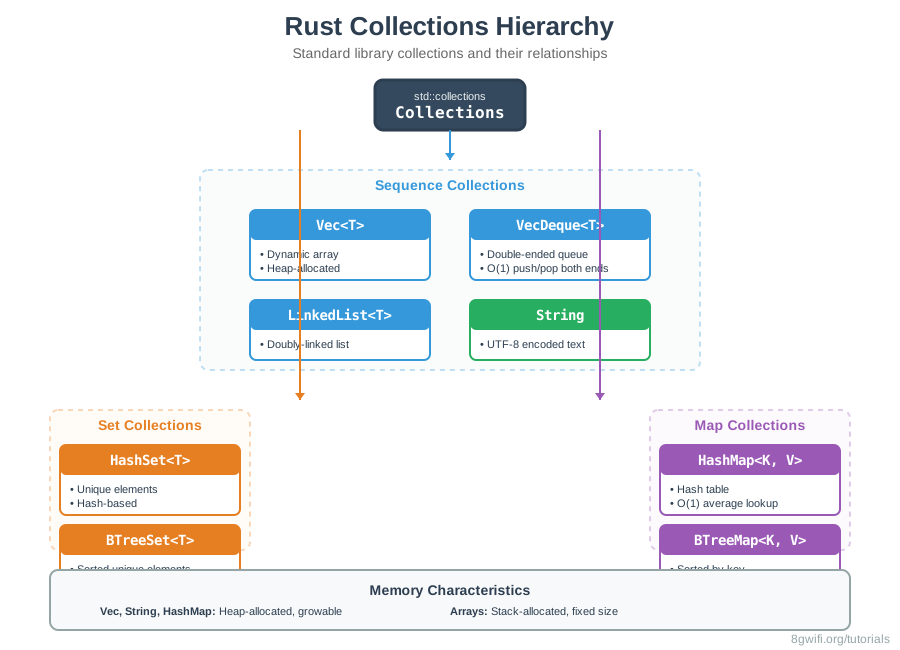
Creating Vectors
There are several ways to create a vector. The most common is using the
vec! macro:
let v = vec![1, 2, 3];You can also create an empty vector and add elements later:
let mut v: Vec = Vec::new();
v.push(1);
v.push(2);
v.push(3); Vec<i32>) or let Rust infer it from the first element you
push.
Click Run to execute your code
Reading Vector Elements
There are two ways to reference a value stored in a vector:
1. Using Index Syntax (Panics on Out of Bounds)
let v = vec![1, 2, 3, 4, 5];
let third = &v[2];
println!("The third element is {}", third);&v[index] will panic
if the index is out of bounds. Use this when you're certain the index exists.
2. Using get() Method (Returns Option)
let v = vec![1, 2, 3, 4, 5];
match v.get(2) {
    Some(third) => println!("The third element is {}", third),
    None => println!("There is no third element."),
}get() when you're not sure if the
index exists. It returns Option<&T>, which you can handle
safely with match or unwrap_or().
Updating Vectors
To add elements to a vector, use the push method. The vector must be
mutable:
let mut v = Vec::new();
v.push(5);
v.push(6);
v.push(7);
v.push(8);
Vector Methods
Vectors have many useful methods for manipulation:
| Method | Description | Example |
|---|---|---|
push(value) |
Add element to end | v.push(5) |
pop() |
Remove and return last element | v.pop() |
insert(index, value) |
Insert at index | v.insert(2, 99) |
remove(index) |
Remove at index | v.remove(2) |
len() |
Get length | v.len() |
is_empty() |
Check if empty | v.is_empty() |
clear() |
Remove all elements | v.clear() |
Click Run to execute your code
Iterating Over Vectors
You can iterate over the elements in a vector using a for loop:
Immutable Iteration
let v = vec![100, 32, 57];
for i in &v {
    println!("{}", i);
}
Mutable Iteration
let mut v = vec![100, 32, 57];
for i in &mut v {
    *i += 50;
}*
to dereference the reference and modify the value.
Vectors and Ownership
Vectors own their data. When you borrow a vector element, you can't modify the vector:
let mut v = vec![1, 2, 3, 4, 5];
let first = &v[0];
// v.push(6);  // Error! Can't borrow as mutable while borrowed as immutable
println!("The first element is: {}", first);Using Enums to Store Multiple Types
Vectors can only store values of the same type. To store different types, use an enum:
enum SpreadsheetCell {
    Int(i32),
    Float(f64),
    Text(String),
}

let row = vec![
    SpreadsheetCell::Int(3),
    SpreadsheetCell::Text(String::from("blue")),
    SpreadsheetCell::Float(10.12),
];Vector Capacity
Vectors have both a length and a capacity:
let mut v = Vec::with_capacity(10);
println!("Capacity: {}, Length: {}", v.capacity(), v.len());
v.push(1);
println!("Capacity: {}, Length: {}", v.capacity(), v.len());When to Use Vectors
Use Vec<T> when:
- You need a dynamic array: When the size is unknown at compile time or needs to grow/shrink
- You need indexed access: When you frequently access elements by index (O(1) access)
- You need ordered data: When the order of elements matters
- You're storing homogeneous data: All elements must be the same type (or use enums for variants)
- You need fast iteration: Vectors are cache-friendly and iterate efficiently
- You're building lists, queues, or stacks: Vectors are perfect for these use cases
Consider alternatives when:
- Fixed size known at compile time: Use arrays
[T; N]instead - Need key-value pairs: Use
HashMap<K, V>for lookups by key - Need unique elements: Use
HashSet<T>for sets - Need double-ended queue: Use
VecDeque<T>for efficient push/pop at both ends - Need sorted order: Use
BTreeSet<T>orBTreeMap<K, V>
Vec::with_capacity() when you know the approximate size to avoid reallocations.
Best Practices
- Use
get()for safe access: Preferget()over index syntax when you're not certain the index exists - Prefer iteration over indexing: Iterating is safer and more idiomatic
- Use
Vec::with_capacity()when you know the size: Reduces reallocations - Consider ownership: Remember that vectors own their data
- Use enums for multiple types: If you need different types, wrap them in an enum
- Avoid unnecessary clones: Use references when possible
Common Mistakes
1. Trying to modify a vector while holding a reference
// Wrong - Can't modify while borrowed
let mut v = vec![1, 2, 3];
let first = &v[0];
v.push(4);  // Error: cannot borrow as mutable

// Correct - Use the reference first, then modify
let mut v = vec![1, 2, 3];
let first = &v[0];
println!("{}", first);  // Use the reference
v.push(4);  // Now we can modify
2. Using index syntax without checking bounds
// Wrong - Panics if index doesn't exist
let v = vec![1, 2, 3];
let value = v[10];  // Panic!

// Correct - Use get() for safe access
let v = vec![1, 2, 3];
match v.get(10) {
    Some(value) => println!("{}", value),
    None => println!("Index out of bounds"),
}
3. Forgetting to make vector mutable for modifications
// Wrong - Vector not mutable
let v = vec![1, 2, 3];
v.push(4);  // Error: cannot borrow as mutable

// Correct - Make vector mutable
let mut v = vec![1, 2, 3];
v.push(4);  // OK
4. Trying to store different types directly in a vector
// Wrong - Can't store different types
let v = vec![1, "hello", 3.14];  // Error: mismatched types

// Correct - Use enum to wrap different types
enum Value {
    Int(i32),
    Str(String),
    Float(f64),
}
let v = vec![
    Value::Int(1),
    Value::Str(String::from("hello")),
    Value::Float(3.14),
];
Exercise: Vectors Practice
Task: Complete the vector operations and implement vector statistics functions.
Requirements:
- Create vectors using different methods
- Access elements safely using
get() - Modify vectors (push, pop, insert, remove)
- Iterate over vectors
- Implement statistics functions (mean, median, mode)
Click Run to execute your code
Show Solution
use std::collections::HashMap;

fn statistics(numbers: &Vec) -> (f64, i32, i32) {
    // Mean
    let sum: i32 = numbers.iter().sum();
    let mean = sum as f64 / numbers.len() as f64;

    // Median
    let mut sorted = numbers.clone();
    sorted.sort();
    let median = sorted[sorted.len() / 2];

    // Mode
    let mut counts = HashMap::new();
    for &num in numbers {
        *counts.entry(num).or_insert(0) += 1;
    }
    let mode = counts.iter()
        .max_by_key(|(_, &count)| count)
        .map(|(&num, _)| num)
        .unwrap_or(0);

    (mean, median, mode)
}

fn main() {
    let numbers = vec![1, 2, 2, 3, 3, 3, 4, 5];
    let (mean, median, mode) = statistics(&numbers);
    println!("Mean: {}, Median: {}, Mode: {}", mean, median, mode);
}
Summary
- Vectors store multiple values of the same type
- Create with
vec![]macro orVec::new() - Access with
&v[index](panics) orv.get(index)(safe) - Modify with
push(),pop(),insert(),remove() - Iterate with
forloops - Vectors own their data
- Can't modify while borrowed (same borrowing rules)
- Use enums to store different types in one vector
- Vectors have length and capacity
- Use
Vec::with_capacity()when you know the size
What's Next?
Now that you understand vectors, you'll learn about HashMaps - a collection type that stores key-value pairs. HashMaps are useful when you need to look up data by a key rather than by an index. In the next lesson, you'll learn how to create, access, and update HashMaps, and use the powerful entry API.
Enjoying these tutorials?