Structs
A struct, short for structure, is a custom data type that lets you package together and name multiple related values. If you're familiar with object-oriented languages, a struct is like an object's data attributes. Structs are one of the fundamental building blocks for creating your own types in Rust.
Defining and Instantiating Structs
To define a struct, we use the struct keyword and name the entire
struct. Then, inside curly
brackets, we define the names and types of the pieces of data, which we call
fields.
struct User {
    username: String,
    email: String,
    sign_in_count: u64,
    active: bool,
}
To use a struct after we've defined it, we create an instance by specifying concrete values for each field:
let user1 = User {
    email: String::from("[email protected]"),
    username: String::from("someuser123"),
    active: true,
    sign_in_count: 1,
};
Click Run to execute your code
Accessing Struct Fields
We can access struct fields using dot notation:
println!("Username: {}", user1.username);
println!("Email: {}", user1.email);
To change a field value, the entire instance must be mutable:
let mut user1 = User {
    email: String::from("[email protected]"),
    username: String::from("someuser123"),
    active: true,
    sign_in_count: 1,
};

user1.email = String::from("[email protected]");Field Init Shorthand
When parameter names match field names, you can use the field init shorthand:
fn build_user(email: String, username: String) -> User {
    User {
        email,      // Shorthand for email: email
        username,   // Shorthand for username: username
        active: true,
        sign_in_count: 1,
    }
}
Struct Update Syntax
You can create a new instance from an existing one using struct update syntax:
let user2 = User {
    email: String::from("[email protected]"),
    ..user1  // Use remaining fields from user1
};
The ..user1 must come last and specifies that the remaining fields
should have the same value
as the fields in user1.
String), those
fields are moved. After using struct update syntax with String
fields,
user1 can no
longer be used!
Click Run to execute your code
Types of Structs
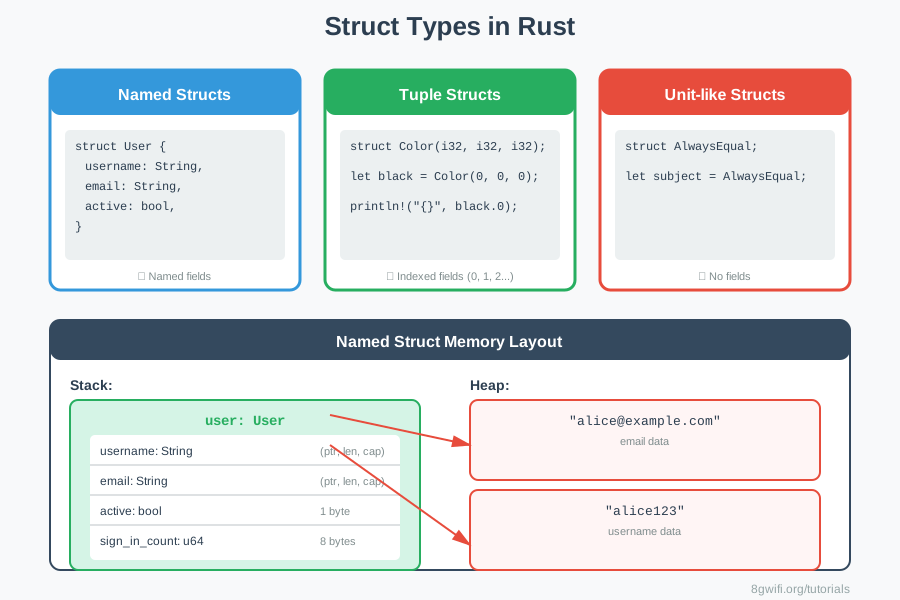
1. Named Structs
The most common type with named fields:
struct Rectangle {
    width: u32,
    height: u32,
}
2. Tuple Structs
Structs that look like tuples but have a name:
struct Color(i32, i32, i32);
struct Point(i32, i32, i32);

let black = Color(0, 0, 0);
let origin = Point(0, 0, 0);

// Access with index
println!("R: {}", black.0);Color and
Point have the same fields,
they're different types! You can't use one where the other is expected.
3. Unit-like Structs
Structs with no fields, useful for implementing traits:
struct AlwaysEqual;

let subject = AlwaysEqual;
Click Run to execute your code
Ownership of Struct Data
In our User struct, we used the owned String type
rather
than the &str
string slice type. This is deliberate - we want each instance to own all of its
data.
struct User {
    username: String,  // Owned
    email: String,     // Owned
    active: bool,
    sign_in_count: u64,
}
It's possible for structs to store references, but that requires the use of lifetimes, which we'll cover in a later module.
When to Use Each Type
| Struct Type | Use When | Example |
|---|---|---|
| Named Struct | Fields have clear names | User, Rectangle |
| Tuple Struct | Few fields, names would be verbose | Color(r, g, b), Point(x, y) |
| Unit-like Struct | Need a type with no data | Trait implementations |
Common Struct Patterns
1. Builder Pattern
fn new_user(email: String, username: String) -> User {
    User {
        email,
        username,
        active: true,
        sign_in_count: 1,
    }
}
2. Default Values
let user = User {
    email: String::from("[email protected]"),
    username: String::from("user"),
    ..Default::default()  // Use default for other fields
};
3. Destructuring
let User { username, email, .. } = user1;
println!("Username: {}", username);
Struct Best Practices
- Use owned types when possible: Prefer
Stringover&strin structs - Name fields clearly: Field names should be descriptive
- Group related data: Structs should represent a cohesive concept
- Use tuple structs sparingly: Only when field names would be redundant
- Consider visibility: Use
pubfor public fields when needed - Keep structs focused: Don't create "god objects" with too many fields
..existing) to create new instances from existing ones. This is especially useful when you want to change only a few fields while keeping the rest the same.
Common Mistakes
1. Trying to mutate immutable struct fields
// Wrong
let user = User {
    email: String::from("[email protected]"),
    username: String::from("user"),
    active: true,
    sign_in_count: 1,
};
user.email = String::from("[email protected]"); // Error: cannot assign

// Correct
let mut user = User {
    email: String::from("[email protected]"),
    username: String::from("user"),
    active: true,
    sign_in_count: 1,
};
user.email = String::from("[email protected]"); // OK
2. Using struct update syntax with non-Copy types incorrectly
// Wrong - user1 is moved and can't be used after
let user1 = User {
    email: String::from("[email protected]"),
    username: String::from("user"),
    active: true,
    sign_in_count: 1,
};
let user2 = User {
    email: String::from("[email protected]"),
    ..user1
};
println!("{}", user1.email); // Error: value moved

// Correct - Clone if you need both
let user2 = User {
    email: String::from("[email protected]"),
    username: user1.username.clone(),
    active: user1.active,
    sign_in_count: user1.sign_in_count,
};
// Or use references if appropriate
3. Confusing tuple structs with regular tuples
// Wrong - These are different types!
struct Color(i32, i32, i32);
struct Point(i32, i32, i32);

let color = Color(255, 0, 0);
let point = Point(0, 0, 0);
let result = add_colors(color, point); // Error: type mismatch

// Correct - Use the right type
fn add_colors(c1: Color, c2: Color) -> Color {
    Color(c1.0 + c2.0, c1.1 + c2.1, c1.2 + c2.2)
}
Exercise: Structs Practice
Task: Complete the struct definitions and functions.
Requirements:
- Define named structs
- Define tuple structs
- Access and modify fields
- Use struct update syntax
- Implement helper functions
Click Run to execute your code
Show Solution
struct Rectangle {
    width: u32,
    height: u32,
}

struct Person {
    name: String,
    age: u32,
}

struct Color(i32, i32, i32);
struct Point3D(f64, f64, f64);

fn main() {
    let rect = Rectangle {
        width: 30,
        height: 50,
    };

    let area = calculate_area(&rect);
    println!("Area: {}", area);

    let person = Person {
        name: String::from("Alice"),
        age: 30,
    };

    println!("Name: {}, Age: {}", person.name, person.age);

    let person2 = Person {
        name: String::from("Bob"),
        ..person
    };

    let red = Color(255, 0, 0);
    println!("Red: ({}, {}, {})", red.0, red.1, red.2);

    let point = Point3D(3.0, 4.0, 0.0);
    let distance = (point.0.powi(2) + point.1.powi(2) + point.2.powi(2)).sqrt();
    println!("Distance from origin: {}", distance);
}

fn calculate_area(rect: &Rectangle) -> u32 {
    rect.width * rect.height
}

fn create_square(size: u32) -> Rectangle {
    Rectangle {
        width: size,
        height: size,
    }
}

fn is_adult(person: &Person) -> bool {
    person.age >= 18
}
Summary
- Structs let you create custom data types
- Named structs: Most common, with named fields
- Tuple structs: Named tuples with indexed fields
- Unit-like structs: No fields, useful for traits
- Access fields with dot notation
- Entire instance must be mutable to change fields
- Field init shorthand: Use when parameter names match fields
- Struct update syntax: Create instances from existing
ones
with
.. - Prefer owned types in structs (e.g.,
String) - Structs follow ownership rules like any other type
What's Next?
Now that you know how to define structs, you'll learn how to add
methods to them.
Methods are functions that are associated with a particular type. In the next
lesson, you'll learn how to
define methods using impl blocks, understand self, and
create associated functions.
Enjoying these tutorials?