Data Types
Rust is a statically typed language, which means it must know the types of all variables at compile time. The compiler can usually infer the type based on the value and how it's used. In this lesson, you'll learn about Rust's scalar types (single values) and compound types (multiple values).
Scalar Types
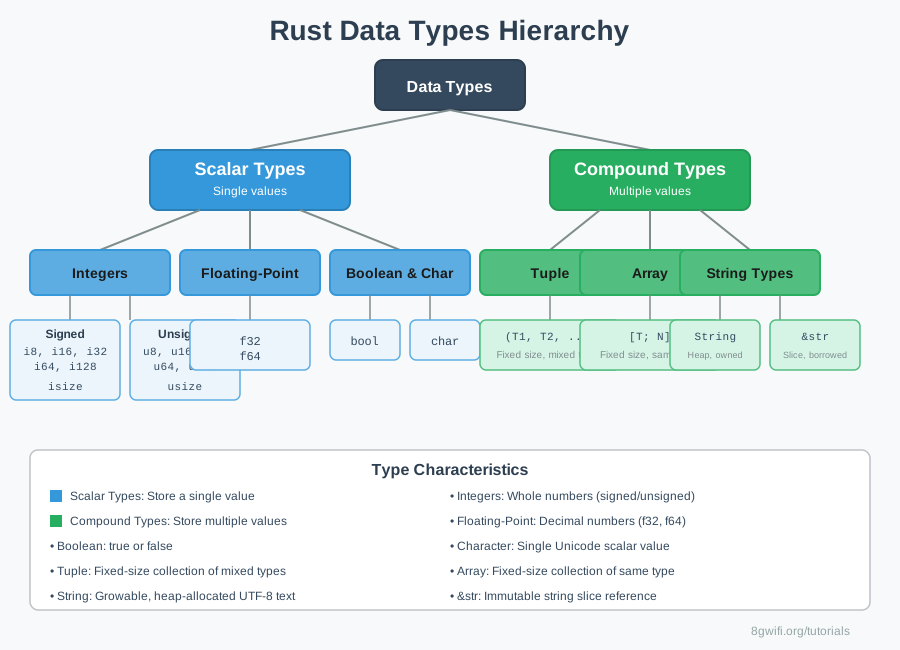
A scalar type represents a single value. Rust has four primary scalar types:
1. Integer Types
Integers are numbers without fractional components. Rust provides both signed and unsigned integers in various sizes:
| Length | Signed | Unsigned |
|---|---|---|
| 8-bit | i8 |
u8 |
| 16-bit | i16 |
u16 |
| 32-bit | i32 (default) |
u32 |
| 64-bit | i64 |
u64 |
| 128-bit | i128 |
u128 |
| arch | isize |
usize |
- Decimal:
98_222 - Hex:
0xff - Octal:
0o77 - Binary:
0b1111_0000 - Byte (u8 only):
b'A'
2. Floating-Point Types
Rust has two floating-point types: f32 (32-bit) and f64
(64-bit, default):
let x = 2.0;      // f64 (default)
let y: f32 = 3.0; // f32
3. Boolean Type
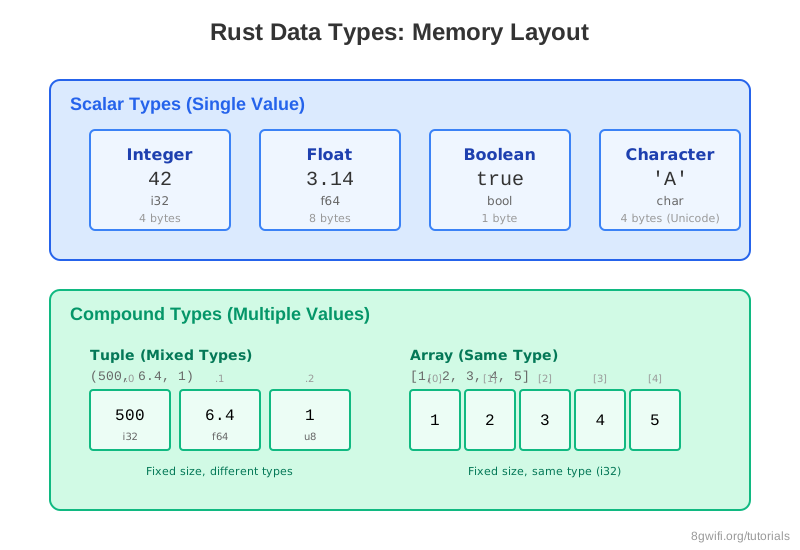
Booleans are one byte in size and have two possible values: true or
false:
let t = true;
let f: bool = false;
4. Character Type
Rust's char type is four bytes in size and represents a Unicode
Scalar Value:
let c = 'z';
let z = 'ℤ';
let heart = '❤';char literals and
double quotes for string literals.
Click Run to execute your code
Compound Types
Compound types can group multiple values into one type. Rust has two primitive compound types:
1. Tuples
A tuple groups together values of different types. Tuples have a fixed length—once declared, they cannot grow or shrink:
let tup: (i32, f64, u8) = (500, 6.4, 1);You can access tuple elements using pattern matching (destructuring) or dot notation:
// Destructuring
let (x, y, z) = tup;

// Dot notation
let five_hundred = tup.0;
let six_point_four = tup.1;(), is
called the unit type.
It represents an empty value or empty return type.
2. Arrays
Unlike tuples, every element of an array must have the same type. Arrays in Rust have a fixed length:
let arr = [1, 2, 3, 4, 5];
let first = arr[0];
let second = arr[1];
You can specify the array's type and length:
let arr: [i32; 5] = [1, 2, 3, 4, 5];Initialize an array with the same value for each element:
let arr = [3; 5]; // Same as [3, 3, 3, 3, 3]
Click Run to execute your code
Type Inference
Rust can often infer the type based on the value and usage:
let x = 5;        // Inferred as i32
let y = 2.0;      // Inferred as f64
let z = true;     // Inferred as bool
let c = 'A';      // Inferred as char
Sometimes you need to provide type annotations when multiple types are possible:
let guess: u32 = "42".parse().expect("Not a number!");Common Mistakes
1. Integer overflow in debug mode
Problem: Assigning a value outside the type's range
let x: u8 = 256; // Error: literal out of range for u8Solution: Use appropriate type or handle overflow explicitly
let x: u16 = 256; // OK: u16 can hold 0-655352. Mixing char and string literals
Wrong:
let c: char = "A"; // Error: expected char, found &strCorrect:
let c: char = 'A'; // Use single quotes for char3. Accessing array out of bounds
Problem: Runtime panic when accessing invalid index
let arr = [1, 2, 3];
let x = arr[5];  // Panic: index out of bounds
Solution: Use get() method for safe access
let x = arr.get(5); // Returns None instead of panickingSummary
- Scalar types represent single values: integers, floats, booleans, characters
- Integer types: Signed (i8-i128) and unsigned (u8-u128),
default is
i32 - Floating-point types:
f32andf64(default) - Boolean:
boolwith valuestrueorfalse - Character:
charis 4 bytes, represents Unicode - Tuples: Fixed-size, mixed types, access via destructuring or dot notation
- Arrays: Fixed-size, same type, access via indexing
- Rust uses type inference but allows explicit type annotations
What's Next?
Now that you understand Rust's type system, you're ready to learn about functions. In the next lesson, you'll learn how to define functions, pass parameters, return values, and understand the difference between statements and expressions in Rust.
Enjoying these tutorials?