Functions
Functions are the building blocks of Rust programs. You've already
seen the most important function:
main, the entry point of many programs. In this lesson, you'll
learn how to define your own functions,
pass parameters, return values, and understand the crucial difference between
statements and expressions.
Defining Functions
Functions are defined using the fn keyword, followed by a name and
parentheses. Rust uses snake_case for function names:
fn function_name() {
    // Function body
}
Click Run to execute your code
- Use
snake_casefor function names - Names should be descriptive and verb-based
- Examples:
calculate_sum,print_message,is_valid
Function Parameters
Functions can take parameters (also called arguments). You must declare the type of each parameter:
fn print_number(x: i32) {
    println!("The number is: {}", x);
}

fn print_sum(x: i32, y: i32) {
    println!("{} + {} = {}", x, y, x + y);
}Return Values
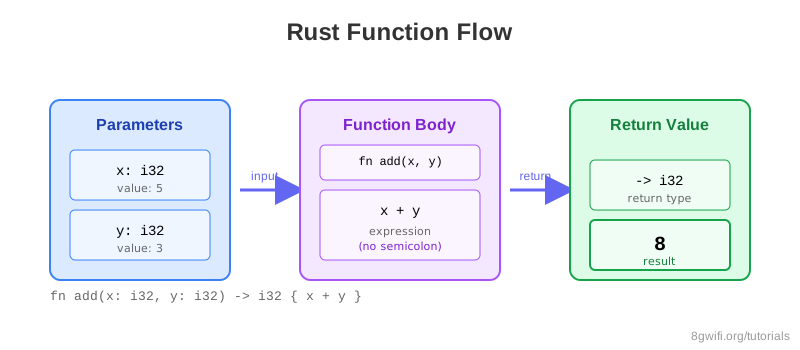
Functions can return values. Declare the return type after an arrow
->:
fn add(x: i32, y: i32) -> i32 {
    x + y  // No semicolon - this is the return value
}
Click Run to execute your code
return keyword for early returns, but it's
idiomatic to omit it for the final value.
Statements vs Expressions
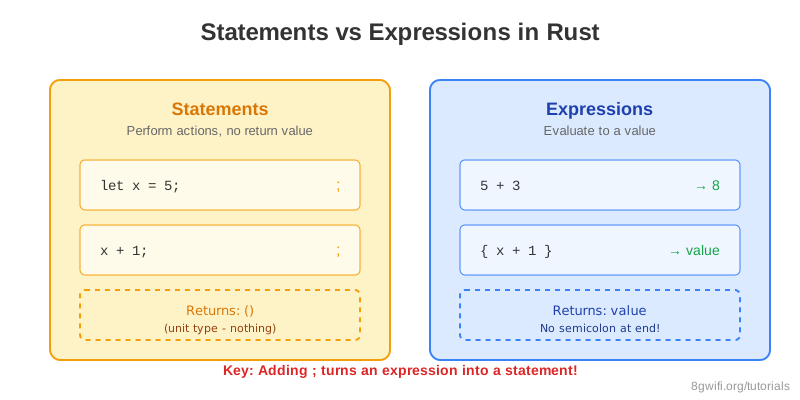
This is a crucial concept in Rust:
| Aspect | Statements | Expressions |
|---|---|---|
| Definition | Instructions that perform an action | Evaluate to a value |
| Return value | Do not return a value | Return a value |
| Semicolon | End with ; |
No ; at the end |
| Examples | let x = 5; |
5 + 6, { x + 1 } |
Click Run to execute your code
x + y returns a value, but x + y; does
not.
Common Mistakes
1. Adding semicolon to return expression
Wrong:
fn add(x: i32, y: i32) -> i32 {
    x + y;  // Error: expected i32, found ()
}
Correct:
fn add(x: i32, y: i32) -> i32 {
    x + y  // No semicolon - this is an expression
}
2. Missing parameter types
Wrong:
fn greet(name) {  // Error: expected type
    println!("Hello, {}!", name);
}
Correct:
fn greet(name: &str) {  // Type annotation required
    println!("Hello, {}!", name);
}
3. Forgetting return type annotation
Wrong:
fn multiply(x: i32, y: i32) {  // Missing -> i32
    x * y
}
Correct:
fn multiply(x: i32, y: i32) -> i32 {
    x * y
}
Exercise: Create Your Own Functions
Task: Implement the missing functions.
Requirements:
- Implement
multiplyto multiply two numbers - Implement
is_evento check if a number is even - Implement
maxto return the larger of two numbers
Click Run to execute your code
Show Solution
fn main() {
    println!("5 * 3 = {}", multiply(5, 3));
    println!("Is 7 even? {}", is_even(7));
    println!("Max of 10 and 20: {}", max(10, 20));
}

fn multiply(a: i32, b: i32) -> i32 {
    a * b
}

fn is_even(n: i32) -> bool {
    n % 2 == 0
}

fn max(a: i32, b: i32) -> i32 {
    if a > b {
        a
    } else {
        b
    }
}
Summary
- Functions are defined with
fnkeyword - Use
snake_casefor function names - Parameter types must be declared explicitly
- Return type is specified with
-> Type - Statements perform actions but don't return values
- Expressions evaluate to values
- Last expression in a function is implicitly returned (no semicolon)
- Use
returnkeyword for early returns
What's Next?
You've learned the fundamentals of Rust: variables, types, and functions. In the next lesson, we'll cover comments and documentation, learning how to write clear, maintainable code and generate beautiful documentation for your Rust projects.
Enjoying these tutorials?