Variables & Mutability
Variables in Rust are immutable by default—a key design choice that promotes safety and prevents bugs. In this lesson, you'll learn how Rust handles variables, when and how to make them mutable, the difference between variables and constants, and the powerful concept of shadowing.
Variables are Immutable by Default
In Rust, when you declare a variable with let, it's immutable by
default. This means once you bind a value to a name, you can't change that
value:
Click Run to execute your code
- Safety: Prevents accidental changes to values
- Concurrency: Immutable data can be safely shared between threads
- Clarity: Makes code easier to reason about
- Optimization: Compiler can make better optimizations
Making Variables Mutable
When you need to change a variable's value, add the mut keyword:
let mut x = 5;  // Mutable variable
x = 6;          // OK: x is mutable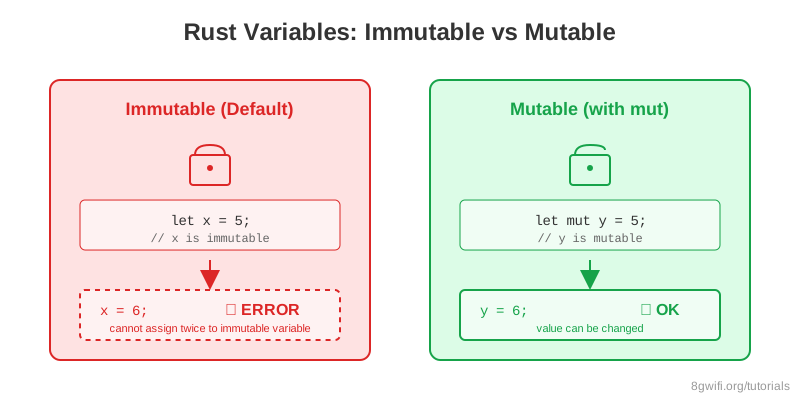
mut when you actually need
to change a variable.
Immutability by default helps catch bugs early and makes your intentions clear.
Constants
Constants are similar to immutable variables, but with important differences:
| Feature | Variables (let) | Constants (const) |
|---|---|---|
| Mutability | Can be made mutable with mut |
Always immutable |
| Type annotation | Optional (type inference) | Required |
| Scope | Any scope | Any scope (often global) |
| Value | Can be runtime value | Must be compile-time constant |
| Naming | snake_case | SCREAMING_SNAKE_CASE |
const MAX_POINTS: u32 = 100_000;
const PI: f64 = 3.14159;

fn main() {
    println!("Max points: {}", MAX_POINTS);
}Shadowing
Rust allows you to declare a new variable with the same name as a previous variable. The new variable shadows the previous one:
Click Run to execute your code
Shadowing vs Mutability
Shadowing is different from marking a variable as mut:
| Aspect | Shadowing | Mutability |
|---|---|---|
| Creates new variable | ✅ Yes | ❌ No |
| Can change type | ✅ Yes | ❌ No |
Requires let |
✅ Yes | ❌ No |
| Variable is immutable | ✅ Yes (by default) | ❌ No |
- When you want to transform a value but keep the same name
- When you need to change the type of a value
- When you want to reuse a descriptive variable name
Common Mistakes
1. Trying to mutate an immutable variable
Wrong:
let x = 5;
x = 6;  // Error: cannot assign twice to immutable variable
Correct:
let mut x = 5;  // Add mut keyword
x = 6;          // OK
2. Forgetting type annotation for constants
Wrong:
const MAX = 100; // Error: missing type annotationCorrect:
const MAX: u32 = 100; // Type annotation required3. Confusing shadowing with mutation
Wrong:
let spaces = "   ";
spaces = spaces.len();  // Error: can't change type without let
Correct:
let spaces = "   ";
let spaces = spaces.len();  // OK: shadowing allows type change
Exercise: Fix the Variables
Task: Fix the code to make it compile and run correctly.
Requirements:
- Make variables mutable where needed
- Fix type mismatches
- Use proper naming conventions for constants
- Use shadowing appropriately
Click Run to execute your code
Show Solution
fn main() {
    // Fix: make count mutable
    let mut count = 0;
    count = count + 1;
    println!("Count: {}", count);

    // Fix: parse string to number
    let age: u32 = 25;  // or "25".parse().unwrap()
    println!("Age: {}", age);

    // Fix: use const with proper naming
    const MAX_USERS: u32 = 100;
    println!("Max users: {}", MAX_USERS);

    // Fix: use shadowing (remove mut)
    let total = 10;
    let total = total + 5;
    let total = total * 2;
    println!("Total: {}", total);
}
Summary
- Variables are immutable by default in Rust for safety and clarity
- Use
let mutto make a variable mutable - Constants use
const, require type annotations, and must be compile-time values - Shadowing creates a new variable with the same name
using
let - Shadowing allows changing the type, while mutation does not
- Use
SCREAMING_SNAKE_CASEfor constants,snake_casefor variables
What's Next?
Now that you understand variables and mutability, let's explore Rust's data types. In the next lesson, you'll learn about scalar types (integers, floats, booleans, characters) and compound types (tuples, arrays), and how Rust's type system ensures safety.
Enjoying these tutorials?