Loops in Rust
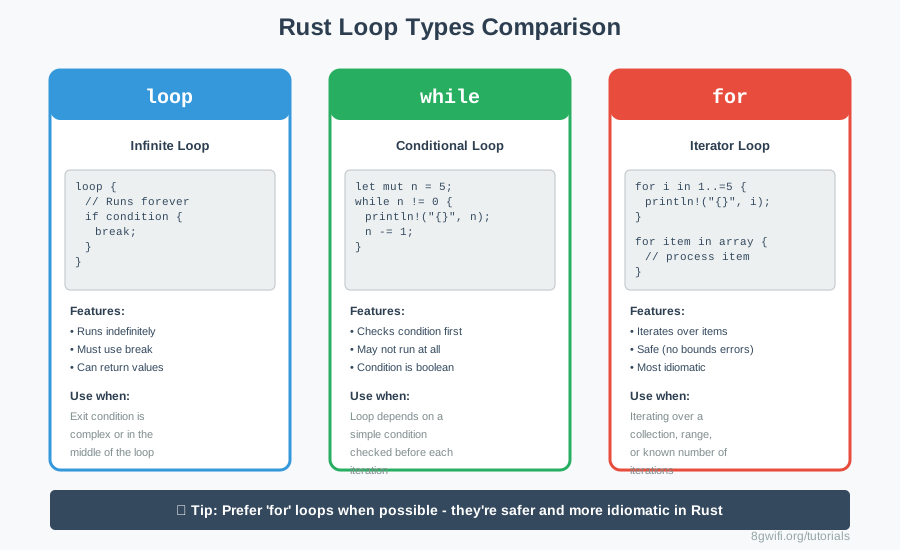
Loops allow you to execute code repeatedly. Rust provides three
types of
loops: loop,
while, and for. Each has its own use case and
advantages. In this lesson, you'll learn
when and how to use each type, along with break,
continue, and loop labels.
The loop Keyword
The loop keyword creates an infinite loop that runs forever unless
explicitly stopped:
loop {
    // This code runs forever
    // Use 'break' to exit
}
Exiting with break
Use break to exit a loop:
let mut counter = 0;

loop {
    counter += 1;
    println!("Counter: {}", counter);

    if counter == 5 {
        break;  // Exit the loop
    }
}
Returning Values from Loops
One unique feature of Rust: loops can return values!
let mut counter = 0;

let result = loop {
    counter += 1;

    if counter == 10 {
        break counter * 2;  // Return 20
    }
};

println!("Result: {}", result); // 20loop when you don't know how
many iterations you need,
or when the exit condition is complex or in the middle of the loop body.
Click Run to execute your code
The while Loop
A while loop runs as long as a condition is true:
let mut number = 3;

while number != 0 {
    println!("{}!", number);
    number -= 1;
}

println!("LIFTOFF!");if, the
condition must evaluate to
true or false. You can't use numbers directly.
| Feature | loop | while |
|---|---|---|
| Condition check | None (infinite) | Before each iteration |
| Guaranteed to run | Yes (at least once) | No (may not run) |
| Exit method | Must use break | Condition becomes false |
| Can return value | Yes | No |
The for Loop
The for loop is the most common and safest way to iterate in Rust:
Iterating Over Ranges
// Exclusive range (1 to 4)
for i in 1..5 {
    println!("{}", i);  // Prints 1, 2, 3, 4
}

// Inclusive range (1 to 5)
for i in 1..=5 {
    println!("{}", i);  // Prints 1, 2, 3, 4, 5
}
Iterating Over Collections
let numbers = [10, 20, 30, 40, 50];

for num in numbers {
    println!("{}", num);
}

// With index
for (index, value) in numbers.iter().enumerate() {
    println!("Index {}: {}", index, value);
}for loops over
while when iterating over
collections or ranges. They're safer (no index out of bounds errors) and more
idiomatic.
break and continue
break - Exit the Loop
break immediately exits the current loop:
for i in 1..=10 {
    if i == 5 {
        break;  // Stop at 5
    }
    println!("{}", i);  // Prints 1, 2, 3, 4
}
continue - Skip to Next Iteration
continue skips the rest of the current iteration and moves to the
next:
for i in 1..=10 {
    if i % 2 != 0 {
        continue;  // Skip odd numbers
    }
    println!("{}", i);  // Prints only even: 2, 4, 6, 8, 10
}
Click Run to execute your code
Loop Labels
For nested loops, you can use labels to specify which loop to
break or continue:
'outer: loop {
    println!("Outer loop");

    'inner: loop {
        println!("Inner loop");

        break 'outer;  // Break the outer loop
    }

    println!("This never runs");
}') followed by a name.
Common names: 'outer, 'inner, 'search,
etc.
Practical Example: Searching in 2D Array
let matrix = [
    [1, 2, 3],
    [4, 5, 6],
    [7, 8, 9],
];

let target = 5;

'search: for (row_idx, row) in matrix.iter().enumerate() {
    for (col_idx, &value) in row.iter().enumerate() {
        if value == target {
            println!("Found {} at ({}, {})", target, row_idx, col_idx);
            break 'search;  // Exit both loops
        }
    }
}
Click Run to execute your code
Common Loop Patterns
1. Countdown
for i in (1..=5).rev() {
    println!("{}", i);  // Prints 5, 4, 3, 2, 1
}
2. Infinite Loop with Condition
loop {
    let input = get_user_input();

    if input == "quit" {
        break;
    }

    process(input);
}
3. Accumulator Pattern
let mut sum = 0;

for i in 1..=100 {
    sum += i;
}

println!("Sum: {}", sum);  // 5050
Common Mistakes
1. Infinite loop without break
Wrong:
loop {
    println!("Forever!");  // This never stops!
}
Correct:
let mut count = 0;
loop {
    println!("Count: {}", count);
    count += 1;
    if count >= 10 {
        break;
    }
}
2. Using while for collections
Less idiomatic:
let arr = [1, 2, 3, 4, 5];
let mut index = 0;

while index < arr.len() {
    println!("{}", arr[index]);
    index += 1;
}
Better (safer):
let arr = [1, 2, 3, 4, 5];

for num in arr {
    println!("{}", num);
}
3. Forgetting to update loop variable
Wrong:
let mut i = 0;
while i < 5 {
    println!("{}", i);
    // Forgot to increment i - infinite loop!
}
Correct:
let mut i = 0;
while i < 5 {
    println!("{}", i);
    i += 1;  // Don't forget this!
}
Exercise: Loop Practice
Task: Fix and complete the loop exercises.
Requirements:
- Fix infinite loops
- Use appropriate loop types
- Implement break and continue
- Use loop labels for nested loops
- Return values from loops
Click Run to execute your code
Show Solution
fn main() {
    // Fixed infinite loop
    let mut i = 0;
    loop {
        i += 1;
        println!("{}", i);
        if i >= 5 {
            break;
        }
    }

    // Countdown
    let mut countdown = 10;
    while countdown > 0 {
        println!("{}", countdown);
        countdown -= 1;
    }

    // Print 1 to 10
    for num in 1..=10 {
        println!("{}", num);
    }

    // Even numbers only
    for num in 1..=20 {
        if num % 2 != 0 {
            continue;
        }
        println!("{}", num);
    }

    // First divisible by 7
    for num in 1..=100 {
        if num % 7 == 0 {
            println!("First number divisible by 7: {}", num);
            break;
        }
    }

    // Pairs that multiply to 12
    for i in 1..=12 {
        for j in 1..=12 {
            if i * j == 12 {
                println!("({}, {})", i, j);
            }
        }
    }

    // Sum 1 to 100
    let mut sum = 0;
    for i in 1..=100 {
        sum += i;
    }
    println!("Sum of 1 to 100: {}", sum);

    // Labeled loop
    let numbers = [
        [10, 20, 30],
        [40, 50, 60],
        [70, 80, 90],
    ];

    'search: for row in numbers {
        for &num in row.iter() {
            if num == 50 {
                println!("Found 50!");
                break 'search;
            }
        }
    }

    // Factorial
    let mut factorial = 1;
    for i in 1..=5 {
        factorial *= i;
    }
    println!("Factorial of 5: {}", factorial);
}
Summary
- loop: Infinite loop, must use
breakto exit - while: Conditional loop, checks condition before each iteration
- for: Iterator loop, safest and most idiomatic for collections
breakexits the current loop immediatelycontinueskips to the next iteration- Loops can return values using
break value - Loop labels (
'label) control nested loops - Ranges:
1..5(exclusive) or1..=5(inclusive) - Prefer
forloops for collections - they're safer!
What's Next?
Now that you understand loops, you're ready to learn about
pattern matching.
In the next lesson, you'll discover Rust's powerful match
expression, which provides
exhaustive pattern matching and is one of Rust's most powerful features.
Enjoying these tutorials?