if Expressions in Rust
Control flow is essential in any programming language. Rust's
if expressions allow you to
execute code conditionally based on boolean conditions. What makes Rust unique
is
that if is an
expression, meaning it can return a value!
Basic if Syntax
The simplest form of if checks a condition and executes a block of
code if it's true:
if condition {
    // Code to execute if condition is true
}bool. Rust will
not automatically convert
other types to boolean. You must use explicit comparison operators.
Click Run to execute your code
if-else Statements
Use else to provide an alternative block of code when the condition
is false:
if condition {
    // Execute if true
} else {
    // Execute if false
}
Multiple Conditions with else if
Chain multiple conditions using else if:
if condition1 {
    // Execute if condition1 is true
} else if condition2 {
    // Execute if condition2 is true
} else {
    // Execute if all conditions are false
}true condition.
Order your conditions from most specific to most general.
Logical Operators
Combine multiple conditions using logical operators:
| Operator | Name | Example | Description |
|---|---|---|---|
&& |
AND | a && b |
True if both are true |
|| |
OR | a || b |
True if either is true |
! |
NOT | !a |
Inverts the boolean |
let age = 25;
let has_license = true;

// Both conditions must be true
if age >= 18 && has_license {
    println!("You can drive!");
}

// At least one condition must be true
if is_weekend || is_holiday {
    println!("Time to relax!");
}

// Negate a condition
if !is_raining {
    println!("Let's go outside!");
}
if as an Expression
This is where Rust shines! Since if is an expression, it can return
a value:
let condition = true;
let number = if condition { 5 } else { 6 };
println!("The number is: {}", number);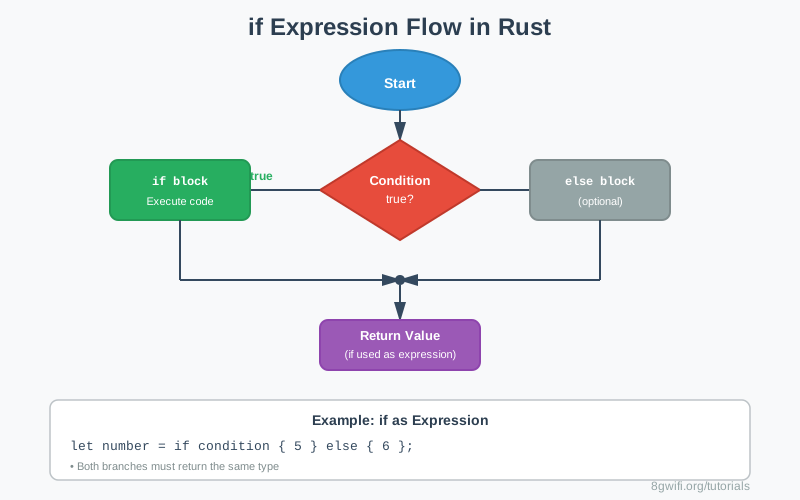
if as an expression,
both branches must return
the same type. This won't compile:
let result = if condition { 5 } else { "six" }; // Error!
Click Run to execute your code
Comparison Operators
Use these operators to create conditions:
| Operator | Meaning | Example |
|---|---|---|
== |
Equal to | x == 5 |
!= |
Not equal to | x != 5 |
< |
Less than | x < 5 |
> |
Greater than | x > 5 |
<= |
Less than or equal | x <= 5 |
>= |
Greater than or equal | x >= 5 |
Common Mistakes
1. Using non-boolean conditions
Wrong:
let number = 5;
if number {  // Error: expected bool, found integer
    println!("Number exists");
}
Correct:
let number = 5;
if number != 0 {  // Explicit comparison
    println!("Number is non-zero");
}
2. Type mismatch in if expression
Wrong:
let result = if condition {
    5
} else {
    "six"  // Error: type mismatch
};
Correct:
let result = if condition {
    "five"
} else {
    "six"  // Both branches return &str
};
3. Forgetting else when using if as expression
Wrong:
let number = if condition { 5 }; // Error: missing else branchCorrect:
let number = if condition { 5 } else { 0 };Best Practices
- Keep conditions simple: Complex conditions are hard to
read. Extract them into variables:
let is_eligible = age >= 18 && has_license && !is_suspended; if is_eligible { // ... } - Use if expressions: Prefer
ifexpressions over mutable variables:// Good let status = if age >= 18 { "adult" } else { "minor" }; // Less idiomatic let mut status = "minor"; if age >= 18 { status = "adult"; } - Consider match: For many conditions,
matchis often clearer than multipleelse if
Exercise: Practice if Expressions
Task: Fix the code to make it compile and work correctly.
Requirements:
- Fix boolean conditions
- Complete if-else chains
- Use if as expression
- Handle type consistency
- Use logical operators
Click Run to execute your code
Show Solution
fn main() {
    // Fixed: Check if number is positive
    let number = 42;
    if number > 0 {
        println!("Number is positive");
    }

    // Complete age categorization
    let age = 25;
    if age >= 65 {
        println!("Senior");
    } else if age >= 18 {
        println!("Adult");
    } else {
        println!("Minor");
    }

    // Use if as expression
    let score = 85;
    let grade = if score >= 90 {
        "A"
    } else {
        "B"
    };
    println!("Grade: {}", grade);

    // Fix type mismatch
    let is_even = true;
    let result = if is_even {
        "even"
    } else {
        "odd"
    };
    println!("Result: {}", result);

    // Absolute value
    let num = -15;
    let absolute = if num < 0 { -num } else { num };
    println!("Absolute value of {}: {}", num, absolute);

    // Multiple conditions
    let temperature = 25;
    let is_sunny = true;
    if temperature > 20 && is_sunny {
        println!("Perfect day!");
    }

    // Max of three numbers
    let a = 10;
    let b = 25;
    let c = 15;
    let max = if a > b && a > c {
        a
    } else if b > c {
        b
    } else {
        c
    };
    println!("Max of {}, {}, {}: {}", a, b, c, max);
}
Summary
ifexpressions allow conditional execution of code- Conditions must be boolean (
trueorfalse) - Use
else iffor multiple conditions - Logical operators:
&&(AND),||(OR),!(NOT) - if is an expression - it can return a value
- Both branches of an if expression must return the same type
- When using if as expression,
elseis required - Comparison operators:
==,!=,<,>,<=,>=
What's Next?
Now that you understand if expressions, you're ready to learn about
loops.
In the next lesson, you'll learn about Rust's three types of loops:
loop, while, and for,
and how to control their execution with break and
continue.
Enjoying these tutorials?