Pattern Matching with match
Pattern matching is one of Rust's most powerful features. The
match expression allows you
to compare a value against a series of patterns and execute code based on which
pattern matches. Unlike
if, match is exhaustive - you must handle all possible
cases.
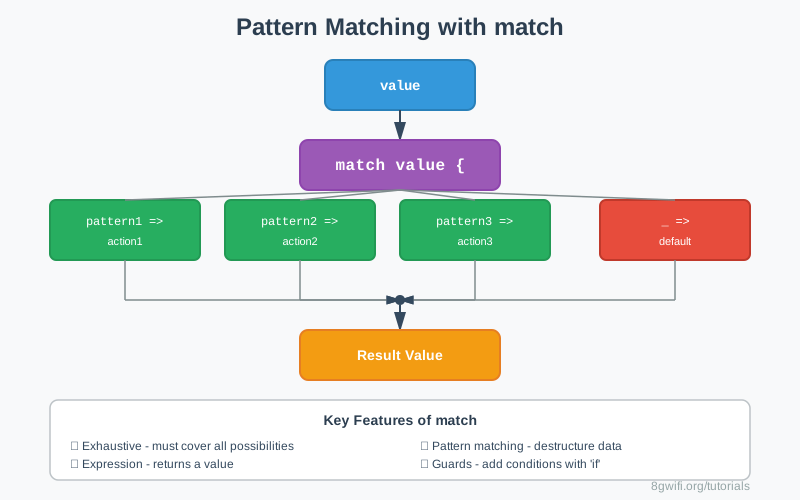
Basic match Syntax
The match expression compares a value against patterns:
match value {
    pattern1 => expression1,
    pattern2 => expression2,
    pattern3 => expression3,
}
Click Run to execute your code
if,
match returns a value.
All arms must return the same type.
Exhaustive Matching
Rust requires that match expressions handle all possible values:
let number = 5;

match number {
    1 => println!("One"),
    2 => println!("Two"),
    _ => println!("Something else"),  // Catch-all required!
}_ (underscore) as a catch-all pattern for remaining cases.
| Pattern | Description | Example |
|---|---|---|
| Literal | Match exact value | 1 => ... |
| Multiple | Match any of several | 1 | 2 | 3 => ... |
| Range | Match a range | 1..=10 => ... |
| Variable | Bind to variable | x => ... |
| Wildcard | Match anything | _ => ... |
Destructuring Patterns
You can destructure tuples, structs, and enums in match patterns:
Destructuring Tuples
let point = (0, 5);

match point {
    (0, 0) => println!("Origin"),
    (0, y) => println!("On Y-axis at {}", y),
    (x, 0) => println!("On X-axis at {}", x),
    (x, y) => println!("Point at ({}, {})", x, y),
}
Matching Option<T>
Pattern matching is perfect for handling Option types:
let some_number = Some(5);

match some_number {
    Some(n) => println!("Got a number: {}", n),
    None => println!("Got nothing"),
}match instead of
unwrap() when handling
Option and Result types. It's safer and more explicit.
Match Guards
Add extra conditions to patterns using if:
let number = 4;

match number {
    n if n < 0 => println!("Negative: {}", n),
    n if n == 0 => println!("Zero"),
    n if n % 2 == 0 => println!("Positive even: {}", n),
    n => println!("Positive odd: {}", n),
}if condition is evaluated after
the pattern matches.
If the guard is false, matching continues to the next arm.
@ Bindings
Use @ to bind a value to a variable while also testing it:
let age = 25;

match age {
    n @ 0..=12 => println!("Child of age {}", n),
    n @ 13..=19 => println!("Teenager of age {}", n),
    n @ 20..=64 => println!("Adult of age {}", n),
    n @ 65.. => println!("Senior of age {}", n),
}
Click Run to execute your code
Ignoring Values
Using _ to Ignore Values
let triple = (5, 10, 15);

match triple {
    (first, _, third) => {
        println!("First: {}, Third: {}", first, third);
        // Second value is ignored
    }
}
Using .. to Ignore Remaining Parts
let numbers = (1, 2, 3, 4, 5);

match numbers {
    (first, .., last) => {
        println!("First: {}, Last: {}", first, last);
    }
}
Common Patterns
1. Simple State Machine
let state = "running";

match state {
    "idle" => println!("System is idle"),
    "running" => println!("System is running"),
    "stopped" => println!("System is stopped"),
    _ => println!("Unknown state"),
}
2. Error Handling with Result
let result: Result = Ok(42);

match result {
    Ok(value) => println!("Success: {}", value),
    Err(error) => println!("Error: {}", error),
}
3. Multiple Conditions
let pair = (2, -5);

match pair {
    (x, y) if x == y => println!("Equal"),
    (x, y) if x > y => println!("{} is greater", x),
    (x, y) => println!("{} is greater", y),
}
Common Mistakes
1. Non-exhaustive match
Wrong:
let number = 5;
match number {
    1 => println!("One"),
    2 => println!("Two"),
    // Error: non-exhaustive patterns
}
Correct:
let number = 5;
match number {
    1 => println!("One"),
    2 => println!("Two"),
    _ => println!("Other"),  // Catch-all
}
2. Type mismatch in arms
Wrong:
let result = match number {
    1 => "one",
    2 => 2,  // Error: type mismatch
    _ => "other",
};
Correct:
let result = match number {
    1 => "one",
    2 => "two",  // All arms return &str
    _ => "other",
};
3. Unreachable patterns
Wrong:
match number {
    _ => println!("Anything"),
    1 => println!("One"),  // Warning: unreachable!
}
Correct:
match number {
    1 => println!("One"),
    _ => println!("Anything"),  // Catch-all goes last
}
Best Practices
- Prefer match over if chains: When you have multiple
conditions,
matchis often clearer - Order patterns from specific to general: Put more specific patterns first
- Use meaningful variable names: Instead of
x, use descriptive names in patterns - Leverage exhaustiveness: Let the compiler help you catch missing cases
- Use guards sparingly: Complex guards can make code hard to read
Exercise: Pattern Matching Practice
Task: Complete the pattern matching exercises.
Requirements:
- Add catch-all patterns
- Use match expressions
- Destructure tuples
- Handle Option types
- Use match guards
- Apply @ bindings
Click Run to execute your code
Show Solution
fn main() {
    // Fixed with catch-all
    let number = 10;
    match number {
        1 => println!("One"),
        2 => println!("Two"),
        3 => println!("Three"),
        _ => println!("Other"),
    }

    // Grade categorization
    let score = 85;
    let grade = match score {
        90..=100 => "A",
        80..=89 => "B",
        70..=79 => "C",
        60..=69 => "D",
        _ => "F",
    };
    println!("Grade: {}", grade);

    // Quadrant determination
    let point = (3, -5);
    match point {
        (x, y) if x > 0 && y > 0 => println!("Quadrant I"),
        (x, y) if x < 0 && y > 0 => println!("Quadrant II"),
        (x, y) if x < 0 && y < 0 => println!("Quadrant III"),
        (x, y) if x > 0 && y < 0 => println!("Quadrant IV"),
        _ => println!("On axis"),
    }

    // Option handling
    let maybe_number: Option = Some(42);
    let value = match maybe_number {
        Some(n) => n,
        None => 0,
    };
    println!("Value: {}", value);

    // Temperature categorization
    let temp = 25;
    match temp {
        t if t < 0 => println!("Freezing"),
        t if t <= 15 => println!("Cold"),
        t if t <= 25 => println!("Comfortable"),
        _ => println!("Hot"),
    }

    // Destructure with ..
    let data = (10, 20, 30, 40, 50);
    match data {
        (first, .., last) => {
            println!("First: {}, Last: {}", first, last);
        }
    }

    // @ binding
    let age = 17;
    match age {
        n @ 0..=12 => println!("Child: {}", n),
        n @ 13..=19 => println!("Teen: {}", n),
        n @ 20..=64 => println!("Adult: {}", n),
        n @ 65.. => println!("Senior: {}", n),
    }

    // Multiple patterns
    let day = 6;
    match day {
        1..=5 => println!("Weekday"),
        6 | 7 => println!("Weekend"),
        _ => println!("Invalid day"),
    }

    // Calculator
    let operation = '+';
    let a = 10;
    let b = 5;
    let result = match operation {
        '+' => a + b,
        '-' => a - b,
        '*' => a * b,
        '/' => a / b,
        _ => 0,
    };
    println!("{} {} {} = {}", a, operation, b, result);
}
Summary
matchis an expression that returns a value- Exhaustive: Must handle all possible cases
- Use
_as a catch-all pattern - Patterns can be literals, ranges, or variables
- Combine multiple patterns with
| - Destructuring: Extract values from tuples, structs, enums
- Match guards: Add conditions with
if - @ bindings: Bind and test values simultaneously
- Use
_to ignore values,..to ignore remaining - All arms must return the same type
- More specific patterns should come before general ones
What's Next?
Congratulations! You've completed Module 3: Control Flow. You now understand
if expressions,
loops, and pattern matching - the building blocks of program logic in Rust.
In the next module, we'll dive into Ownership - the feature that makes Rust unique. You'll learn about ownership rules, borrowing, references, and how Rust achieves memory safety without a garbage collector.
Enjoying these tutorials?