HashMaps
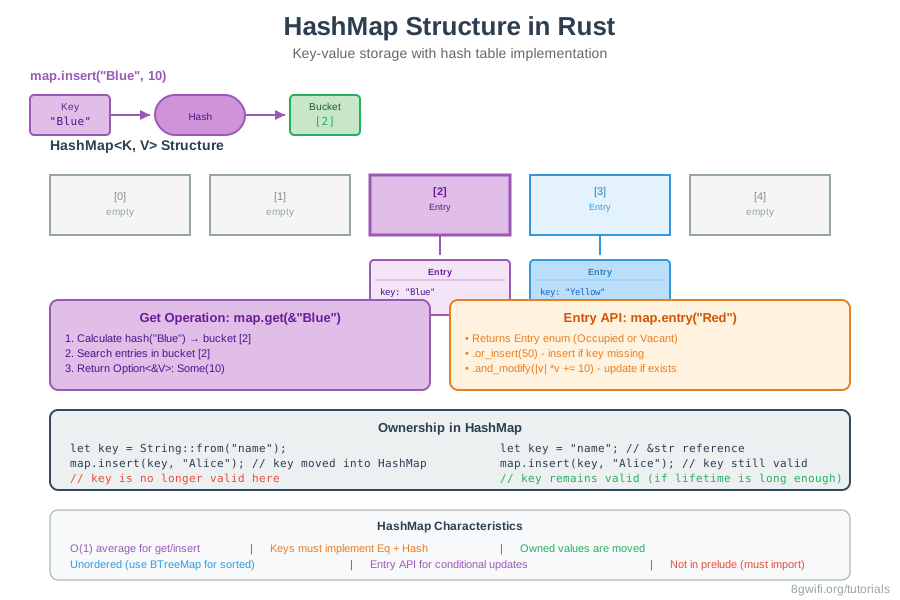
A HashMap stores a mapping of keys of type K to
values of type V. It does this via a hashing function, which
determines how it places these keys and values into memory. HashMaps are useful
when you need to look up data not by an index, but by using a key that can be of
any type.
Creating HashMaps
HashMaps are not included in the prelude, so you need to import them:
use std::collections::HashMap;

let mut scores = HashMap::new();
scores.insert(String::from("Blue"), 10);
scores.insert(String::from("Yellow"), 50);Vec and String,
HashMap is not in the prelude, so you must import it with
use std::collections::HashMap;.
Creating HashMaps from Vectors
You can create a HashMap from a vector of tuples using collect():
use std::collections::HashMap;

let teams = vec![
    (String::from("Blue"), 10),
    (String::from("Yellow"), 50),
];
let scores: HashMap<_, _> = teams.into_iter().collect();<_, _> tells Rust to infer
the key and value types from the vector. You could also write
HashMap<String, i32> explicitly.
Click Run to execute your code
Accessing Values
You can get a value out of the HashMap by providing its key to the
get method:
use std::collections::HashMap;

let mut scores = HashMap::new();
scores.insert(String::from("Blue"), 10);
scores.insert(String::from("Yellow"), 50);

let team_name = String::from("Blue");
let score = scores.get(&team_name);
The get method returns an Option<&V>, so the
result is wrapped in Some if the key exists, or None if
it doesn't:
match score {
    Some(s) => println!("Score: {}", s),
    None => println!("Team not found"),
}
Updating HashMaps
HashMaps have several ways to update values:
1. Overwriting a Value
If you insert a value with a key that already exists, the value will be overwritten:
scores.insert(String::from("Blue"), 10);
scores.insert(String::from("Blue"), 25);  // Overwrites 10
println!("{:?}", scores);  // {"Blue": 25}
2. Only Inserting If the Key Has No Value
Use the entry API with or_insert:
scores.entry(String::from("Yellow")).or_insert(50);
scores.entry(String::from("Blue")).or_insert(50);  // Won't overwrite
3. Updating a Value Based on the Old Value
The entry API also allows you to update a value based on the old
value:
let text = "hello world wonderful world";
let mut map = HashMap::new();

for word in text.split_whitespace() {
    let count = map.entry(word).or_insert(0);
    *count += 1;
}entry method returns an
Entry enum that represents a value that might or might not exist.
The or_insert method returns a mutable reference to the value for
the corresponding Entry key if that key exists, and if not, inserts
the parameter as the new value.
Iterating Over HashMaps
You can iterate over each key-value pair in a HashMap:
for (key, value) in &scores {
    println!("{}: {}", key, value);
}BTreeMap instead, which stores keys in sorted
order.
Ownership
For types that implement the Copy trait, like i32, the
values are copied into the HashMap. For owned values like String, the
values will be moved and the HashMap will be the owner of those values:
use std::collections::HashMap;

let field_name = String::from("Favorite color");
let field_value = String::from("Blue");

let mut map = HashMap::new();
map.insert(field_name, field_value);
// field_name and field_value are invalid at this pointString) into a HashMap, ownership is transferred. The variables are
no longer valid after insertion. If you insert references, the values must be
valid for the lifetime of the HashMap.
HashMap Methods
| Method | Description | Example |
|---|---|---|
insert(k, v) |
Insert or update key-value pair | map.insert("key", 10) |
get(&k) |
Get value by key (returns Option) | map.get(&"key") |
get_mut(&k) |
Get mutable reference to value | map.get_mut(&"key") |
entry(k) |
Get entry for key (Entry API) | map.entry("key") |
remove(&k) |
Remove key-value pair | map.remove(&"key") |
len() |
Get number of key-value pairs | map.len() |
contains_key(&k) |
Check if key exists | map.contains_key(&"key") |
Common Patterns
1. Word Counting
let text = "hello world wonderful world";
let mut word_count = HashMap::new();

for word in text.split_whitespace() {
    let count = word_count.entry(word).or_insert(0);
    *count += 1;
}
2. Default Values
let score = scores.get(&team_name).copied().unwrap_or(0);3. Conditional Updates
scores.entry(team_name.clone())
    .and_modify(|e| *e += 10)
    .or_insert(50);
When to Use HashMaps
Use HashMap<K, V> when:
- You need key-value lookups: When you need to look up values by a key rather than by index
- You need fast lookups: O(1) average time complexity for get/insert operations
- You're building caches or indexes: HashMaps are perfect for caching computed values
- You're counting occurrences: Use HashMap to count frequencies (e.g., word counts, character counts)
- You're grouping data: When you need to group items by a key (e.g., employees by department)
- You need associative arrays: When you need to map one set of values to another
- Order doesn't matter: HashMaps are unordered (use
BTreeMapif you need sorted order)
Consider alternatives when:
- You need ordered keys: Use
BTreeMap<K, V>for sorted key-value pairs - You only need keys (no values): Use
HashSet<T>for unique elements - You need indexed access: Use
Vec<T>for sequential, indexed data - You have a small, fixed set: Consider using arrays or tuples for small datasets
- Keys don't implement Hash: You'll need to use
BTreeMapwhich only requiresOrd
HashMap when you need fast lookups and order doesn't matter. Use BTreeMap when you need sorted keys, need to iterate in order, or when your keys don't implement Hash (but do implement Ord).
Best Practices
- Use
entry()API: More efficient than checking and inserting separately - Prefer
get()over indexing:get()returnsOption, safer than panicking - Consider key types: Keys must implement
EqandHashtraits - Use references when possible: Avoid unnecessary clones of keys
- Consider
BTreeMapfor ordering: If you need sorted keys - Handle missing keys: Always handle the
Nonecase fromget()
FxHashMap from the rustc-hash
crate).
Common Mistakes
1. Forgetting to import HashMap
// Wrong - HashMap not in prelude
let mut map = HashMap::new();  // Error: cannot find type `HashMap`

// Correct - Import HashMap
use std::collections::HashMap;
let mut map = HashMap::new();
2. Using owned values when references would work
// Wrong - Unnecessary String allocation
let mut map = HashMap::new();
map.insert(String::from("key"), 10);  // String moved

// Correct - Use &str if keys live long enough
let mut map: HashMap<&str, i32> = HashMap::new();
let key = "key";
map.insert(key, 10);  // key still valid
3. Not handling Option from get()
// Wrong - Can panic if key doesn't exist
let value = map.get(&"key").unwrap();  // Panics if None

// Correct - Handle the Option
match map.get(&"key") {
    Some(value) => println!("{}", value),
    None => println!("Key not found"),
}

// Or use unwrap_or for defaults
let value = map.get(&"key").copied().unwrap_or(0);
4. Trying to use types that don't implement Hash as keys
// Wrong - Vec doesn't implement Hash
let mut map: HashMap<Vec<i32>, i32> = HashMap::new();  // Error!

// Correct - Use types that implement Hash
let mut map: HashMap<String, i32> = HashMap::new();
// Or use a tuple of hashable types
let mut map: HashMap<(i32, i32), i32> = HashMap::new();
Exercise: HashMaps Practice
Task: Implement an employee database using HashMaps.
Requirements:
- Add employees to departments
- List all people in a department
- List all people in company by department (sorted)
- Use the entry API for efficient updates
Click Run to execute your code
Show Solution
use std::collections::HashMap;

fn add_employee(db: &mut HashMap<String, Vec<String>>, name: String, dept: String) {
    db.entry(dept).or_insert_with(Vec::new).push(name);
}

fn list_department(db: &HashMap<String, Vec<String>>, dept: &str) {
    if let Some(employees) = db.get(dept) {
        println!("Employees in {}:", dept);
        for emp in employees {
            println!("  - {}", emp);
        }
    } else {
        println!("Department '{}' not found", dept);
    }
}

fn list_all(db: &HashMap<String, Vec<String>>) {
    let mut depts: Vec<&String> = db.keys().collect();
    depts.sort();

    for dept in depts {
        println!("{}:", dept);
        let mut employees = db[dept].clone();
        employees.sort();
        for emp in employees {
            println!("  - {}", emp);
        }
    }
}

fn main() {
    let mut company: HashMap<String, Vec<String>> = HashMap::new();

    add_employee(&mut company, String::from("Sally"), String::from("Engineering"));
    add_employee(&mut company, String::from("Bob"), String::from("Sales"));
    add_employee(&mut company, String::from("Alice"), String::from("Engineering"));

    list_department(&company, "Engineering");
    list_all(&company);
}
Summary
- HashMap<K, V> stores key-value pairs
- Must import from
std::collections - Create with
HashMap::new()orcollect() - Access with
get(&key)(returnsOption<&V>) - Insert/update with
insert(key, value) - Use entry API for conditional updates
- Keys must implement
EqandHash - Owned values are moved into HashMap
- HashMaps are unordered
- Use
BTreeMapfor sorted key-value pairs
What's Next?
Congratulations! You've completed the Collections module. You now know how to work with vectors, strings, and HashMaps - three of the most commonly used collection types in Rust.
In the next modules, you'll learn about error handling in depth (panic, Result, error propagation), and more advanced Rust features like traits, generics, and lifetimes that build on these foundations.
Enjoying these tutorials?