Defining Methods
A Method (often called a function in other languages) is a block of code that runs only when it is called. Methods are used to perform certain actions, and they are essential for reusing code: define the code once, and use it many times.
Anatomy of a Method
Every method has a signature that defines its name, return type, and parameters.
public static void myMethod() {
    // Code to be executed
}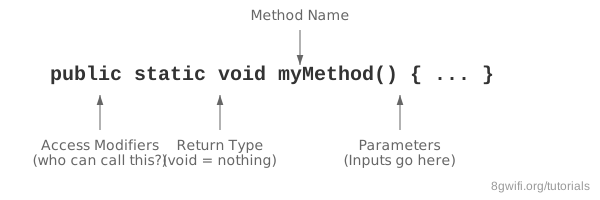
public static: Modifiers. We usestatichere so we can call it from themainmethod without creating an object.void: The return type.voidmeans this method does not return any value.myMethod: The name of the method. Standard Java naming convention iscamelCase.(): Parentheses. Parameters go inside here (more on that later).
Calling a Method
To use a method, you "call" or "invoke" it by writing the method's name followed
by two parentheses () and a semicolon.
public class Main {
    static void myMethod() {
        System.out.println("I just got executed!");
    }

    public static void main(String[] args) {
        myMethod(); // Call the method
        myMethod(); // Call it again!
    }
}
Output
Click Run to execute your code
Why Use Methods?
- Reusability: Write code once and use it multiple times.
- Organization: Break complex programs into smaller, manageable chunks.
- Maintenance: If logic changes, you only need to update the code in one place.
Summary
- A method is a block of code that executes when called.
- Use
camelCasefor method names (e.g.,calculateTax). - The
statickeyword allows the method to belong to the class rather than an instance. - The
voidkeyword means no value is returned.
Enjoying these tutorials?