Java Arrays
An array is a container object that holds a fixed number of values of a single type. Unlike variables that hold just one value, an array can hold dozens, hundreds, or even thousands of values under a single name.
Anatomy of an Array
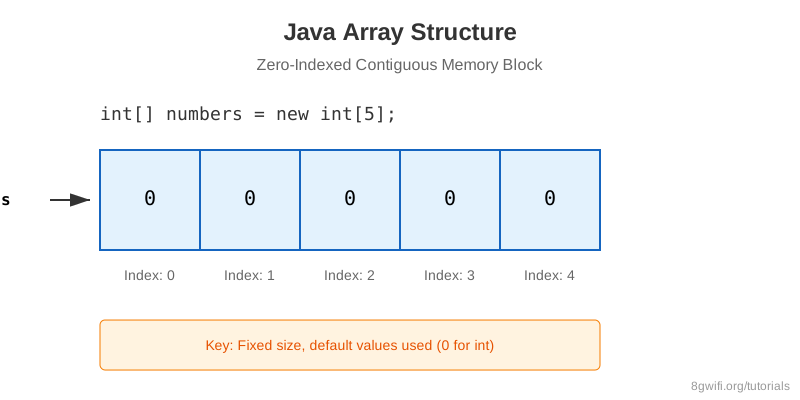
Think of an array as a row of mailboxes. Each mailbox has an index number, and you can put data inside each one.
- Fixed Size: Once created, you cannot change the size of an array.
- Same Type: All elements must be of the same data type
(e.g., all
int). - Zero-Indexed: The first element is at index 0, not 1.
Click Run to execute your code
ArrayIndexOutOfBoundsException
This is the most common error with arrays. If an array has a size of 5, valid
indices are 0, 1, 2, 3, 4. accessing arr[5] will crash your
program!
Ways to Initialize Arrays
There are a few different ways to create and fill arrays, depending on whether you know the values upfront or just the size.
// 1. Size only (Default values: 0, null, false)
int[] nums = new int[5];

// 2. Values directly (Array Literal)
String[] names = {"Alice", "Bob", "Charlie"};
Click Run to execute your code
Looping Through Arrays
To process all elements in an array, we typically use a for loop.
int[] scores = {10, 20, 30};

// Standard For Loop
for (int i = 0; i < scores.length; i++) {
    System.out.println(scores[i]);
}

// Enhanced For-Each Loop (Clean & Readable)
for (int score : scores) {
    System.out.println(score);
}
Summary
- Arrays store multiple values of the same type in a contiguous memory block.
- Arrays have a fixed size that cannot be changed.
- Array indices start at 0.
- Use
array.lengthto find out how many items an array can hold.
What's Next?
You've mastered single-dimensional arrays. But what if you need a grid, a matrix, or a table of data? That's where Multi-dimensional Arrays come in. Let's explore 2D arrays in the next lesson.
Enjoying these tutorials?