Introduction to Java
Java is one of the most popular programming languages in the world, powering millions of applications from enterprise software to Android apps. In this lesson, you'll learn what Java is, why it's so widely used, and understand the key components that make Java work: JDK, JRE, and JVM.
What is Java?
Java is a high-level, object-oriented, class-based programming language designed to have as few implementation dependencies as possible. Developed by Sun Microsystems (now owned by Oracle) and released in 1995, Java was designed with the principle of "Write Once, Run Anywhere" (WORA).
- Platform Independent: Java code compiles to bytecode that runs on any device with a Java Virtual Machine (JVM)
- Object-Oriented: Everything in Java is an object, making code modular and reusable
- Secure: Built-in security features and sandbox execution
- Robust: Strong memory management and exception handling
- Multithreaded: Built-in support for concurrent programming
JDK, JRE, and JVM
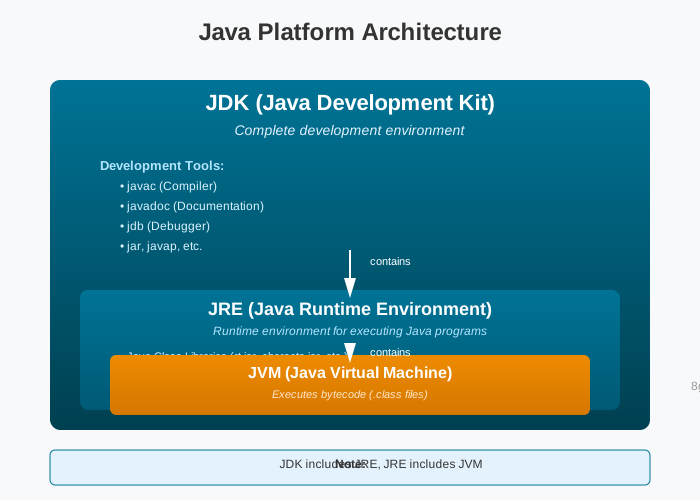
Understanding the difference between JDK, JRE, and JVM is crucial for Java development. These three components work together to enable Java's platform independence.
JVM (Java Virtual Machine)
The JVM is a virtual machine that executes Java bytecode. It's platform-specific (different JVM for Windows, Linux, macOS) but provides a consistent runtime environment. The JVM:
- Loads bytecode (.class files)
- Verifies bytecode for security
- Executes bytecode by converting it to native machine code
- Manages memory (garbage collection)
JRE (Java Runtime Environment)
The JRE is a software package that provides everything needed to run Java applications. It includes:
- JVM (Java Virtual Machine)
- Java class libraries (rt.jar, charsets.jar, etc.)
- Supporting files and properties
Note: JRE is sufficient if you only want to run Java programs. You don't need JRE if you have JDK installed.
JDK (Java Development Kit)
The JDK is a complete development environment for Java. It includes:
- Everything in JRE
- Development tools (javac compiler, javadoc, jdb debugger, etc.)
- Source code and documentation
For development: You need JDK installed. It contains all tools necessary to write, compile, and debug Java programs.
| Component | Contains | Used For |
|---|---|---|
| JVM | Virtual machine that executes bytecode | Running Java programs |
| JRE | JVM + Java libraries | Running Java programs |
| JDK | JRE + Development tools | Developing Java programs |
- JVM = The foundation (runs code)
- JRE = Foundation + walls (can run programs)
- JDK = Complete house with tools (can build and run programs)
Platform Independence
Java's most powerful feature is platform independence, enabled by the JVM. Here's how it works:
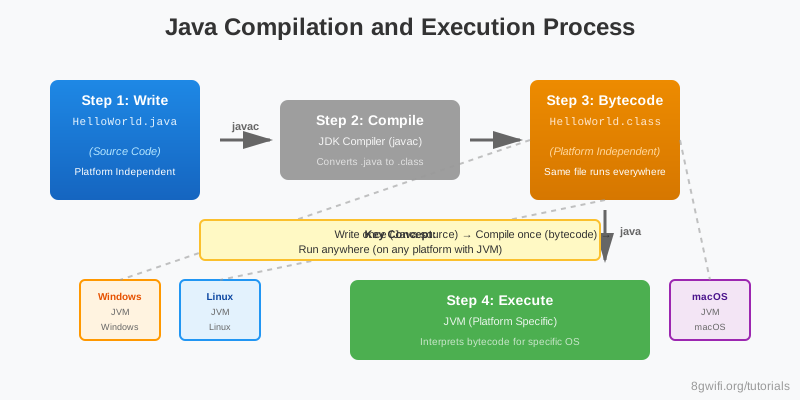
- Write: You write Java source code (.java files) on any platform
- Compile: The JDK compiler (javac) converts .java to .class bytecode files
- Distribute: Bytecode is platform-independent - the same .class files work everywhere
- Run: JVM (platform-specific) interprets bytecode for the specific operating system
Java Versions
Java has evolved significantly since its release. Here are some major milestones:
| Version | Year | Key Features |
|---|---|---|
| Java 1.0 | 1996 | Initial release |
| Java 5 | 2004 | Generics, autoboxing, annotations |
| Java 8 | 2014 | Lambda expressions, Streams API, default methods |
| Java 11 | 2018 | LTS version, HTTP client, local variable syntax |
| Java 17 | 2021 | Current LTS, sealed classes, pattern matching |
Installation
To start developing Java applications, you need to install the JDK. Here's how:
1. Download JDK
- Visit Oracle's JDK download page or
- Use Eclipse Temurin (Adoptium) for open-source JDK
2. Install JDK
- Windows: Run the installer and follow the wizard
- macOS: Use Homebrew:
brew install openjdk@17 - Linux: Use package manager:
sudo apt install openjdk-17-jdk
3. Verify Installation
Open terminal/command prompt and run:
java -version
javac -versionJAVA_HOME is set
to your JDK installation directory, and that the bin directory is
in your PATH environment variable.
Common Mistakes
1. Confusing JDK with JRE
Problem: Trying to compile Java code with only JRE installed
# Error: javac command not found
javac HelloWorld.java
Solution: Install JDK (which includes JRE) to get the compiler
2. Multiple Java Versions
Problem: Having multiple Java versions installed without proper configuration
Solution: Use JAVA_HOME environment variable to
specify which version to use, or use tools like jenv
(macOS/Linux) to manage versions
Summary
- Java is a platform-independent, object-oriented programming language
- JVM executes Java bytecode and is platform-specific
- JRE = JVM + Java libraries (for running programs)
- JDK = JRE + Development tools (for developing programs)
- Java's "Write Once, Run Anywhere" is enabled by bytecode and JVM
- Install JDK to develop Java applications
What's Next?
Now that you understand what Java is and how it works, you're ready to write your first Java program! In the next lesson, you'll learn how to create a Java class, write the main method, and see your code come to life.
Enjoying these tutorials?