Access Modifiers
Access modifiers control the visibility of class members. TypeScript provides three modifiers: public, private, and protected for proper encapsulation.
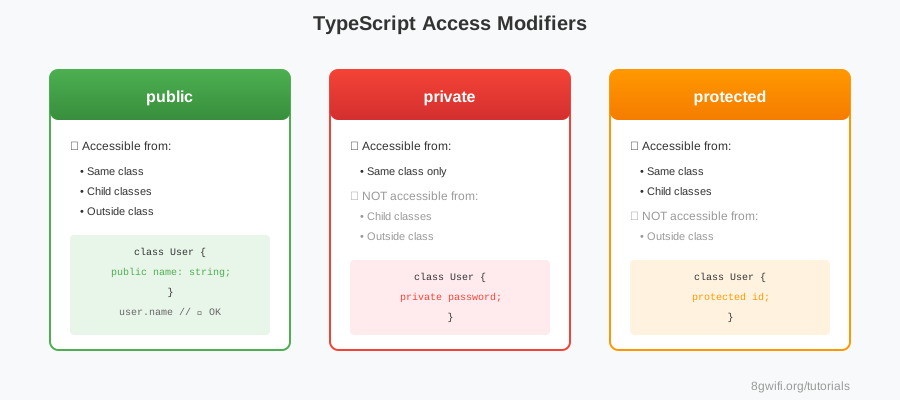
Access Modifiers
Output
Click Run to execute your code
Default: If no modifier is specified, members
are
public by default.Modifier Comparison
| Modifier | Same Class | Child Class | Outside |
|---|---|---|---|
| public | ✓ | ✓ | ✓ |
| protected | ✓ | ✓ | ✗ |
| private | ✓ | ✗ | ✗ |
When to Use Each Modifier
- public: API methods, properties meant to be accessed externally
- private: Internal implementation details, sensitive data
- protected: Properties/methods for inheritance hierarchy
Common Mistakes
1. Making Everything Public
// ✗ Poor encapsulation
class User {
    public password: string;  // Exposed!
    public internalId: number;  // Should be private
}

// ✓ Proper encapsulation
class User {
    private password: string;
    private internalId: number;
    public userName: string;
}
2. Using Private When Protected is Needed
class Animal {
    private makeSound() {}  // ✗ Child can't override
}

class Dog extends Animal {
    makeSound() {}  // Error!
}

// ✓ Use protected for inheritance
class Animal {
    protected makeSound() {}
}
Note: TypeScript access modifiers are
compile-time only. They don't exist in JavaScript runtime.
Summary
- public: Accessible everywhere (default)
- private: Only within the same class
- protected: Same class + child classes
- Use private for sensitive data and internal logic
Enjoying these tutorials?