Discriminated Unions
Discriminated unions (tagged unions) use a common property to distinguish between union members, enabling type-safe pattern matching.
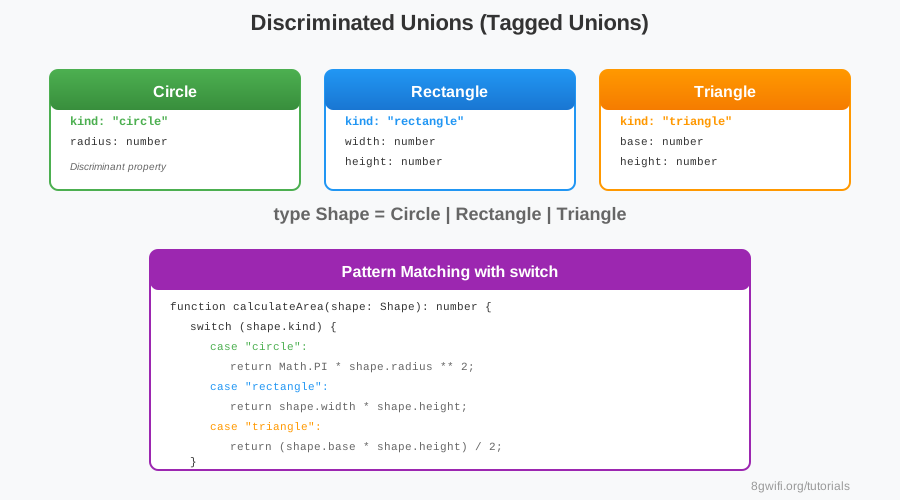
Basic Discriminated Union
Output
Click Run to execute your code
Key Components:
- Discriminant: Common property (e.g.,
kind) - Union members: Types with different discriminant values
- Switch/if: Pattern match on discriminant
Why Use Discriminated Unions?
- Type safety: TypeScript narrows types automatically
- Exhaustiveness: Compiler ensures all cases handled
- Clarity: Clear intent with explicit type tags
- Refactoring: Adding new types shows missing cases
Pattern Matching
type Result =
    | { status: "success"; data: T }
    | { status: "error"; error: string }
    | { status: "loading" };

function handleResult(result: Result) {
    switch (result.status) {
        case "success":
            console.log(result.data);  // ✓ TypeScript knows data exists
            break;
        case "error":
            console.log(result.error);  // ✓ TypeScript knows error exists
            break;
        case "loading":
            console.log("Loading...");
            break;
    }
}
Common Mistakes
1. Inconsistent Discriminant Names
// ✗ Wrong - different property names
type A = { type: "a"; value: string };
type B = { kind: "b"; value: number };  // Different name!

// ✓ Correct - same property name
type A = { kind: "a"; value: string };
type B = { kind: "b"; value: number };
2. Missing Cases
type Shape = Circle | Rectangle | Triangle;

function area(shape: Shape): number {
    switch (shape.kind) {
        case "circle":
            return Math.PI * shape.radius ** 2;
        case "rectangle":
            return shape.width * shape.height;
        // ✗ Missing triangle case!
    }
    return 0;  // Unsafe fallback
}
Best Practice: Use discriminated unions for
state machines, API responses, and complex data structures.
Summary
- Discriminated unions use a common discriminant property
- TypeScript narrows types based on discriminant
- Perfect for pattern matching with switch
- Ensures exhaustive handling of all cases
What's Next?
Congratulations! Module 4 complete. Next: Generics & Utility Types!
Enjoying these tutorials?